
Solutions
Cut List Optimizer and CNC Export
To optimize cuts in Mimerra, type or paste your product's parts list and define your own boards with thickness, sheet size and price. Mimerra calculates how many sheets you need, the waste percentage and the total cost, respecting saw kerf, edge trim and grain direction. The cutting plan downloads as a layered DXF (sheet, part, offcut, label) and a CSV with the cut dimensions for your CAM software or machine. The layout is heuristic with no guarantee of the optimal solution, and no price or rate is estimated for you.
Try it free: first preview without sign-up
The first result is watermarked and the daily free allowance is limited. To continue, create a free account; gift credits are added at sign-up, no card needed.
How it works in 3 steps
- 1
Add the product or parts
Type or paste the parts list, pick a Mimerra project or create the product from scratch.
- 2
Define your material
Enter sheet size, thickness and price once; it is reused for all your furniture.
- 3
Get the plan and files
See the cutting plan, waste and cost; download layered DXF and CSV and carry it into a quote.
Example: kitchen plan → production files
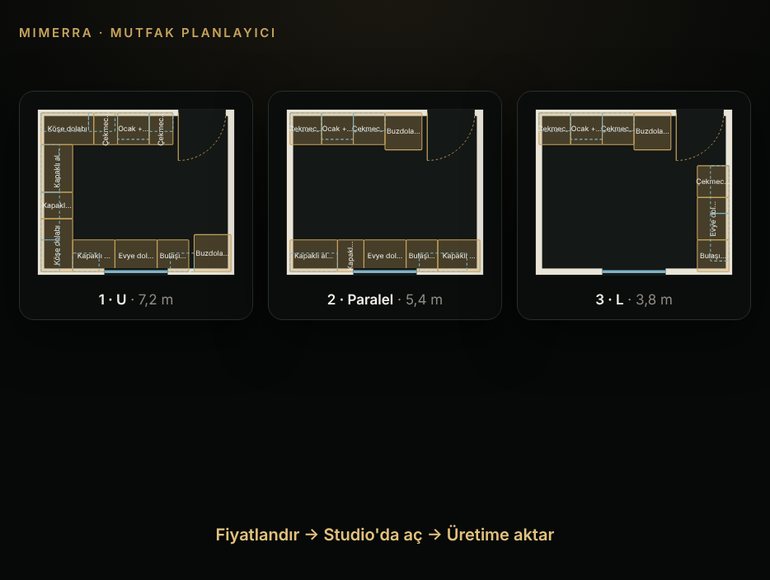
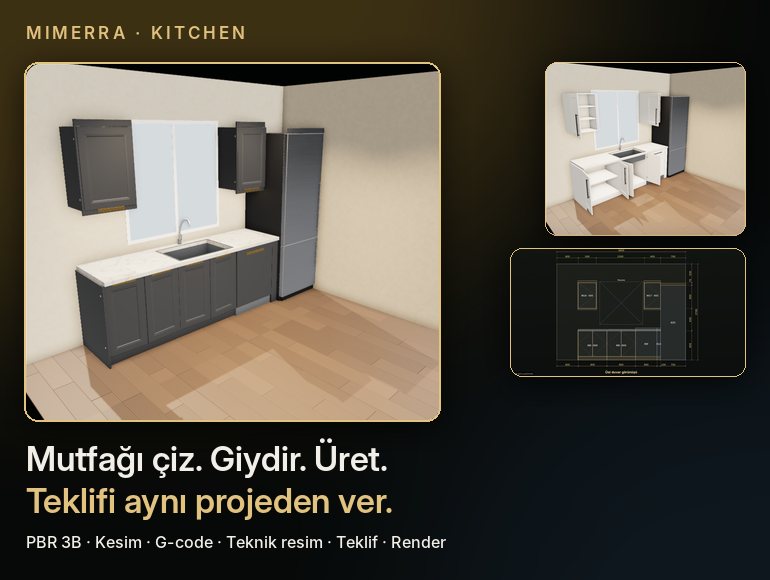
The images are previews of the "AI Kitchen Planner" and "Mimerra Kitchen" cards in the app.
Mimerra Kitchen: from design to production (short video)
Common cutting plan problems
- Parts are laid out on sheets by hand; waste and sheet count are guesses
- Grain direction on patterned boards gets missed and parts are cut the wrong way
- Cutting plan, cost and quote live in separate spreadsheets and are redone after every change
With Mimerra
- Type or paste the parts list: no need to redesign the furniture in Mimerra
- Sheets needed, waste percentage and total cost from your own material, sheet size and price
- Saw kerf, edge trim and grain direction are respected; parts on patterned boards are not rotated
- Cutting plan as layered DXF (sheet, part, offcut, label) and a CSV with the cut dimensions
Key features
Technical and Production
Bill of materials, part drawings, cutting plan, cost and a branded quote on the same product; each step opens on its own.
Mimerra Kitchen
For kitchen cabinets and panel furniture: from modules to cut list, sheet layout, CNC file and quote in one project.
CNC output
Tool-layered DXF and an operations CSV; in Mimerra Kitchen, ISO-style G-code from your own tool values (post not verified on any machine).
Frequently asked questions
Do I have to redesign my furniture in Mimerra?
No. Typing or pasting the parts list of your product is enough. You can also pick a Mimerra project or create the product from scratch.
Which files do I get?
A layered DXF for the cutting plan (SHEET, PART, OFFCUT, LABEL layers) and a CSV with the cut dimensions in a generic column layout. Drilling and groove operations are written to DXF on tool layers in the part drawings.
Will the G-code fit my machine?
Mimerra Kitchen can generate ISO / Fanuc-style G-code, but this post has not been verified on any machine. You enter tool, spindle, feed and safety values, nothing is generated before you approve, and the first run should be done without a board. There are no machine-specific posts (such as Biesse CIX); you can give the layered DXF to your CAM software.
Does the optimizer guarantee the least waste?
No. Layout uses a heuristic algorithm that gives a good result but no guarantee of the optimal one. The waste percentage is shown on every plan.
How is it priced?
With credits: credits are only used when an image or file is produced, and refunded if a generation fails. There is no subscription and purchased credits never expire. Current packages are on the Pricing page; gift credits are added at sign-up.
Related pages
Related guides
Turn your parts list into a cutting plan
Open Technical and Production and add your product or parts list. Gift credits are added at sign-up.