
Solutions
AI Render Software: Photorealistic Renders with AI
AI render software turns a photo, sketch, plan or view of a 3D model into a photorealistic image with AI — no lighting, material or render-engine setup. Mimerra does this in the browser: you get interior designs from an empty room photo and renders from sketches and plans, and with the SketchUp and 3ds Max plugins you render 1K, 2K or 4K without leaving the model (4K in about 1–2 minutes on average). Because rendering happens on Mimerra's servers, you do not need a powerful computer, and credits are only used when an image is actually generated.
How it works, in 3 steps
- 1
Pick an image or model
Upload a room photo, sketch or plan, or send the camera view from the SketchUp or 3ds Max plugin.
- 2
Set the style and resolution
Describe the style, materials or mood; pick 1K, 2K or 4K in the plugins.
- 3
Render and revise
Download the result, revise any part in writing, or render a new angle.
Example: 3ds Max viewport → Mimerra AI render
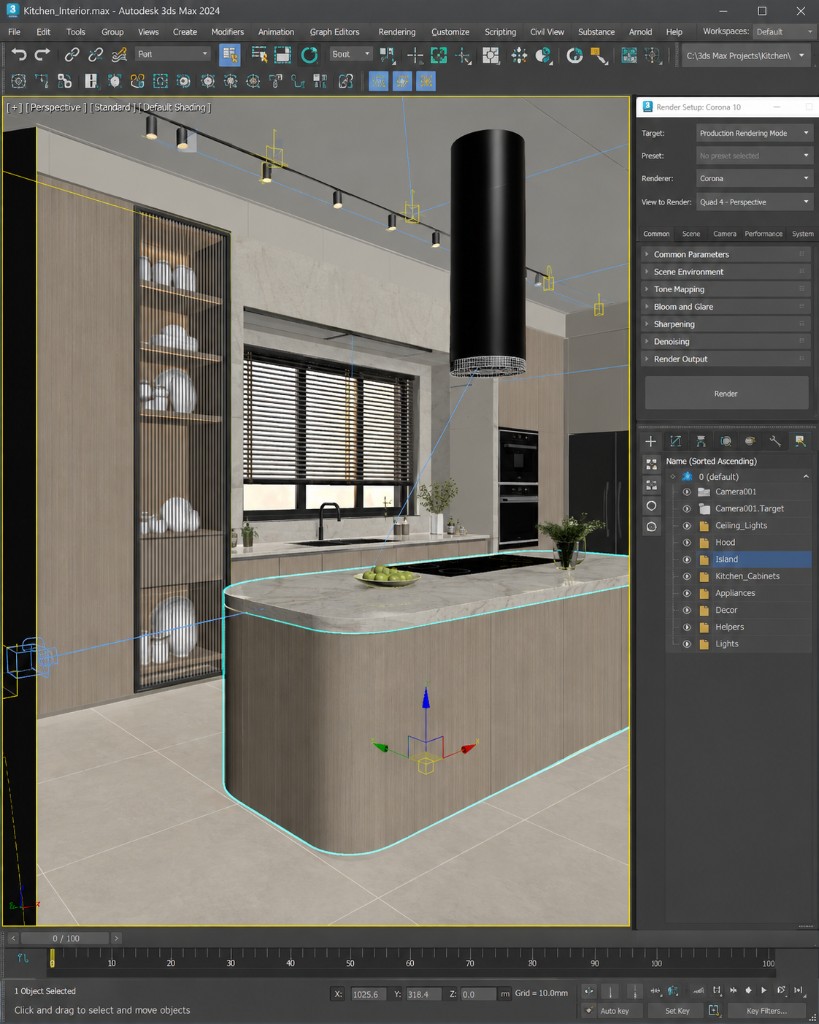
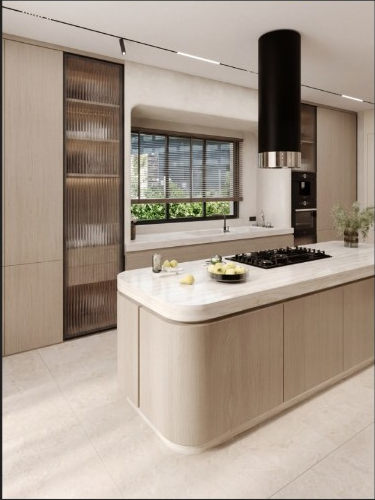
The example from the 3ds Max plugin page: same scene, same camera.
Where classic rendering loses time
- Lighting, material and camera setup takes expertise and hours
- High-resolution rendering needs a powerful graphics card
- Every revision means waiting in the render queue again
- Showing clients several alternatives gets expensive
With Mimerra
- Renders from a photo, sketch, plan or model view
- Rendering happens on the server; a browser or plugin is enough
- 1K / 2K / 4K options in the SketchUp and 3ds Max plugins
- Ask for revisions in writing, render new angles
Key capabilities
Design from a room photo
Create a new interior design from an empty or furnished room photo.
Sketch and plan to render
Turn a hand sketch or a plan (PDF, image, DXF) into a photorealistic image.
Render without leaving your model
Render with the SketchUp and 3ds Max plugins while keeping your camera angle.
Frequently asked questions
What is AI render software?
Software that turns a photo, sketch, plan or view of a 3D model into a photorealistic image with AI. Unlike classic render engines, you do not set up lighting, materials and cameras; you steer the result in writing.
Do I need a powerful computer for AI rendering?
Not with Mimerra. Renders are generated on Mimerra's servers; a browser or the SketchUp/3ds Max plugin is enough.
Does it replace V-Ray, Corona or Lumion?
You can use Mimerra alongside your current workflow for fast concept, alternative and revision images; the 3ds Max plugin works with Corona and V-Ray scenes. For final work that needs full control you can keep using your classic engine.
Which files does it work with?
Room photos and images; PDF, image or DXF for plans; plugins for SketchUp and 3ds Max (3ds Max 2023–2026).
Can I try it for free?
You can explore the sample project without signing up. Renders are generated with credits, and credits are only used when an image is actually generated — failed results are not charged. Current packages are on the Pricing page.
Related pages
Related guides
See your first AI render
Explore the sample project without signing up, or download a plugin and render from your own scene.