
Solutions
AI Render vs V-Ray and Corona
AI rendering is not a one-to-one replacement for V-Ray, Corona, Enscape or Lumion; it is a complementary method that produces concepts and alternatives from the same scene much faster. In Mimerra you send a 3ds Max or SketchUp view through the plugin and get a photorealistic image without setting up lights and materials: 1 credit at 1K, 2 at 2K and 3 at 4K, and credits are only used when an image is produced. For final work that needs physical accuracy and full control you can keep using your classic engine; the Mimerra 3ds Max plugin works with Corona and V-Ray scenes.
How to try it in 3 steps
- 1
Install the plugin
Install the 3ds Max or SketchUp plugin and sign in with your Mimerra account.
- 2
Send the scene
Set the camera, choose the resolution and start the render; your scene and camera are used as they are.
- 3
Compare
Compare the result with the output of your own engine and decide which to use for which job.
Example: 3ds Max viewport → Mimerra 4K render
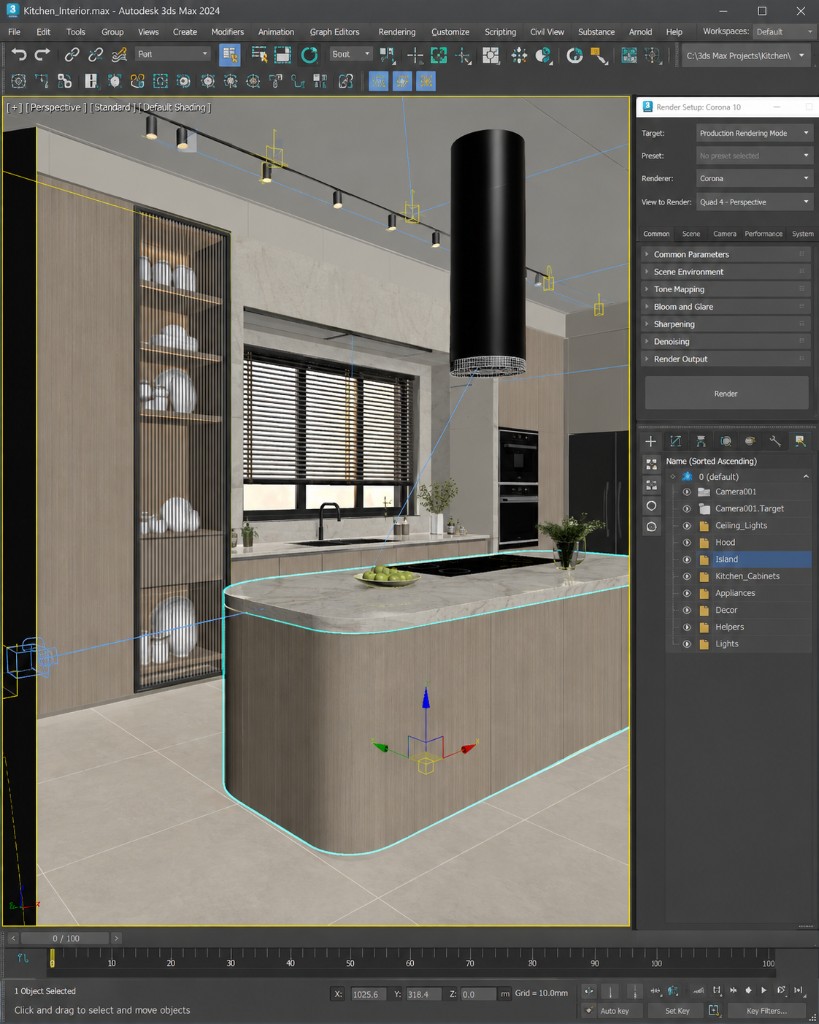
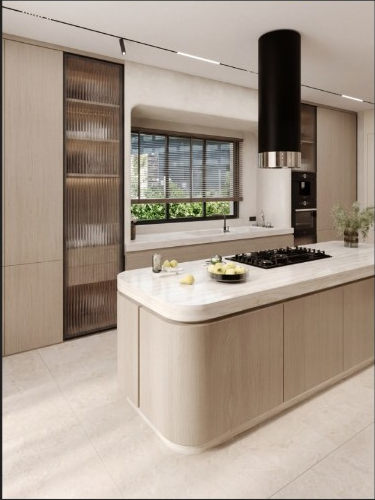
The comparison from the 3ds Max plugin page: same scene and camera, with no light or material setup.
Where the time goes in a classic render engine
- Lights, materials and cameras are set up again for every scene
- Each client revision means another render queue
- High resolution needs strong hardware or a render farm
With Mimerra
- 1K, 2K or 4K renders from a 3ds Max or SketchUp scene without leaving the software
- Visual references and written instructions instead of light and material settings
- Renders are produced in the cloud, independent of your graphics card
- A 3ds Max plugin that works with Corona and V-Ray scenes
Which one for which job?
When AI rendering fits
Concepts, first presentations, style and material alternatives, fast client revisions and work at the quote stage.
When a classic engine fits
Final images that need full physical control of light and materials, long frame-consistent animations and technically exact work.
Using both
Get quick alternatives from the same scene with Mimerra first, then produce the final output of the approved design in your own engine.
Frequently asked questions
Will AI rendering replace V-Ray or Corona?
Most studios use AI rendering alongside a classic engine for concepts, alternatives and quick revisions. For final work that needs full control you can keep using your engine.
Do I need a V-Ray or Corona licence?
No. Mimerra produces the render on its own cloud infrastructure, and the plugin also works with scenes prepared for Corona and V-Ray.
Can it be used instead of Enscape or Lumion?
For quick presentation images and alternatives, yes. For real-time navigation and long animations those tools have their own strengths; Mimerra offers short videos and the Walk Inside the Render scenario.
How does pricing work?
With credits: credits are only used when an image or file is produced, and refunded if a generation fails. There is no subscription, and purchased credits never expire. Current packages are on the Pricing page.
Related pages
Related guides
Try the same scene with AI
Explore the sample project without signing up, or install the 3ds Max plugin and render your own scene.