
Free · no sign-up
AI kitchen design
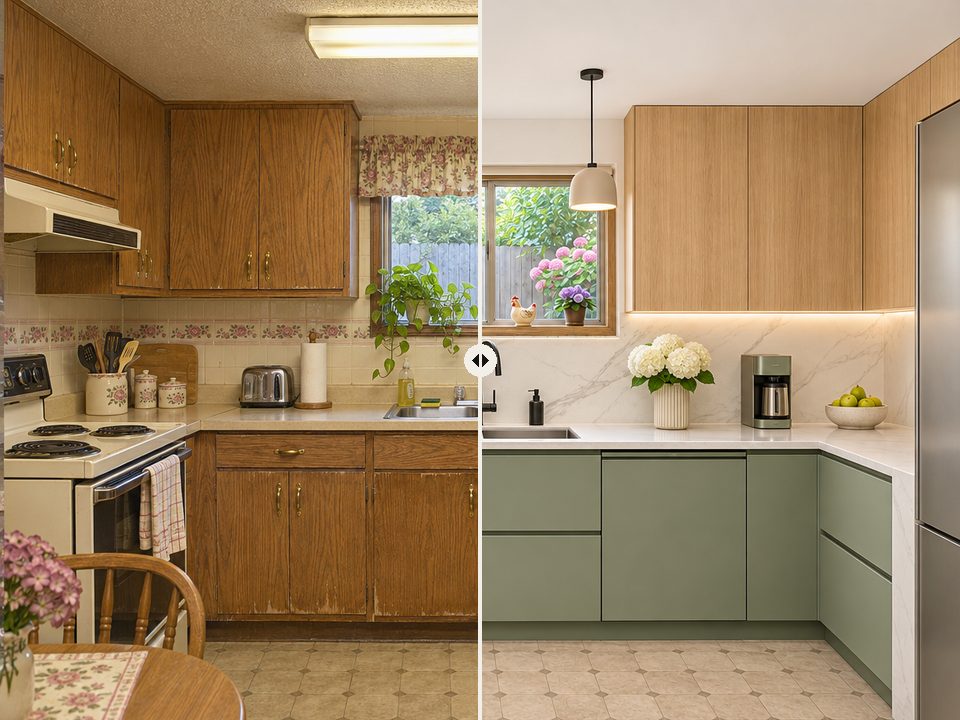
Take a photo of your kitchen as it is today and choose one of eight styles. Walls, windows, doors and plumbing positions stay; cabinet fronts, worktop, backsplash and lighting are renewed in your style. You do not need an account to see the first result.
Example made with Mimerra
How it works
- 1 Upload a well-lit photo that shows the whole kitchen.
- 2 Pick a style (modern, Japandi, Scandinavian, classic…).
- 3 Review the preview; if you like it, create a free account to generate the full-resolution version without the watermark and more alternatives.
Frequently asked questions
Will my kitchen layout change?
No. The tool keeps the existing layout, walls, windows and doors; it changes surfaces, cabinet fronts, worktop and lighting only. To try a new layout, use the kitchen planner on Mimerra.
How many times can I try for free?
Without an account you get a limited number of watermarked previews per day. When they run out, create a free account and continue with the gift credits given at sign-up; no card needed.
Is my photo stored?
Your photo is used only for this preview and is not stored on the server. If you create an account, it is kept in this browser only so you can continue, then moved into your account.
What can I do with the result?
Download and share the preview. In your account you can generate the same kitchen in other styles, change fronts and worktop materials, and prepare the cabinets for production with Mimerra Kitchen.
More free tools
- AI bathroom design Upload a photo of your bathroom and pick a style: AI redesigns the same bathroom with new tiles, vanity, fixtu…
- AI living room design Upload a photo of your living room and pick a style: AI restyles the same room with new furniture, colors, tex…
- Sketch to render Upload a hand sketch or line drawing, pick materials and mood: AI turns it into a photorealistic render in the…
- Room area calculator Free room area calculator: floor area, wall area minus doors and windows, flooring with waste, tile count and …
- Interior design style quiz Free interior design style quiz: 6 questions to find the style that fits your home (Japandi, Scandinavian, mod…
- Room color palette generator Free room color palette generator: pick a base color and mood, get wall, furniture and accent colors with HEX …
- Decorating budget calculator Free decorating budget calculator: split your total budget across furniture, lighting, textiles, finishes and …
- Furniture layout planner Free furniture layout tool: enter your room size and see a suggested layout and clearances for a living room, …
- Kitchen layout calculator Free kitchen layout calculator: counter length, number of 60 cm cabinet modules and work triangle check for I,…
- Interior design brief generator Free interior design brief generator: enter spaces, style, budget range, timeline and constraints; download a …
- Render resolution and aspect ratio calculator Free render resolution calculator: the right pixel size, aspect ratio, megapixels and DPI for Instagram, Reels…
- Room decor ideas generator Free room decor ideas: get material, color, lighting and signature piece ideas by space, style and budget leve…